

Here, we provide a concise guide for users who need to disconnect a sales channel from their CommerceBlitz OMNI account. It outlines the straightforward process of navigating to the Account Settings menu and removing an unwanted integration.
Access Account Settings:
- Go to the main menu
- Select ‘Account Settings‘
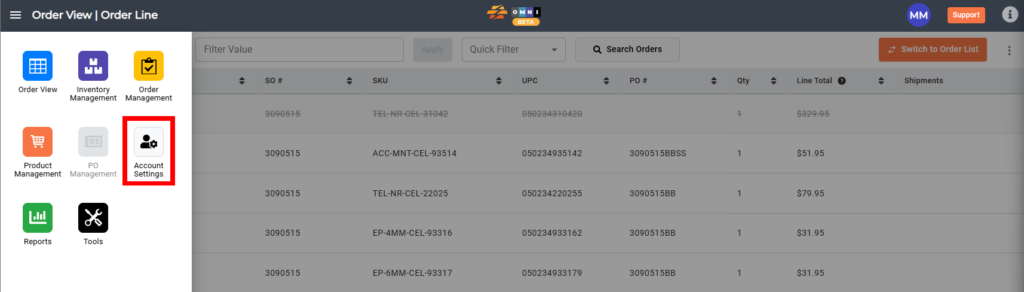
Deleting an integrated sales channel:
- Select the ‘Integrations‘ submenu
- Select the ‘Installed‘ tab
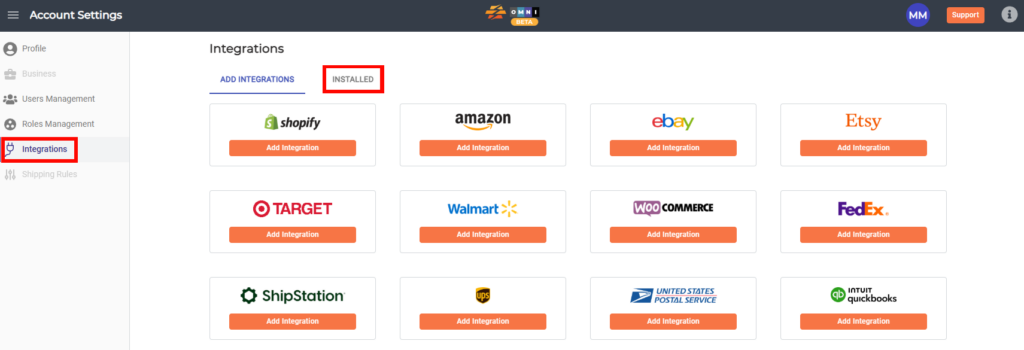
- Select the installed store you wish to remove
- Disconnect integration by selecting the ‘Disconnect‘ command button

